Performance
Largest Contentful Paint (LCP)
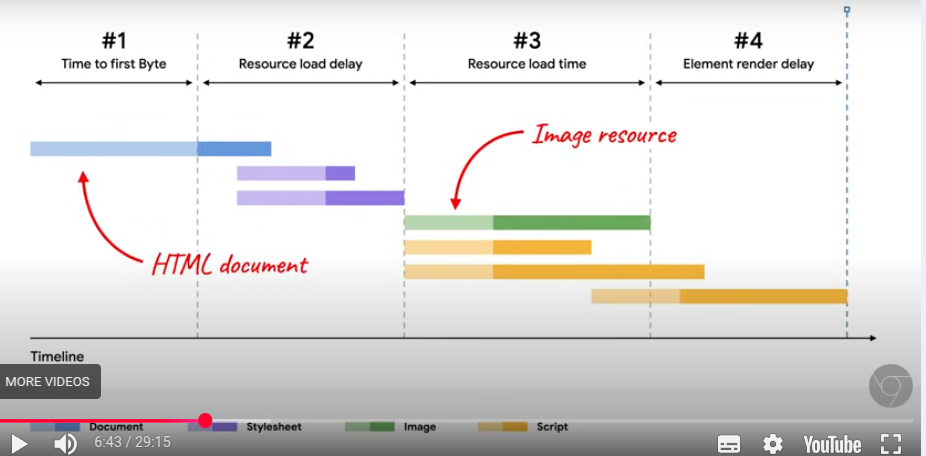
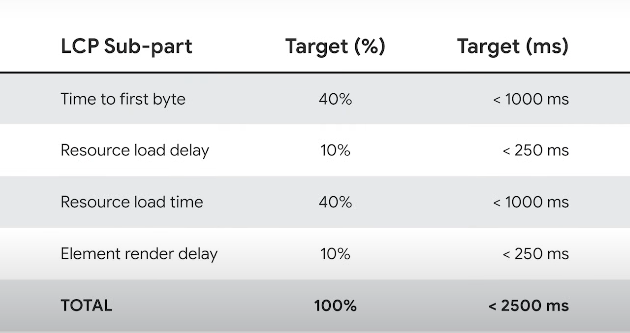
Split into four parts
- TTFB (Time to First Byte) - time it take till the browser receives first byte from server
- Resource Load Delay - How long it takes till browser receives resources (images, fonts etc.)
- Load Delay will be 0 if the LCP is a text node using system fonts (no need to fetch anything)
- you want this to be as small as possible
- Resource Load Time - How long it takes for the resource to actually load
- will be 0 if no need to fetch anything
- optimising images will reduce this (smaller file size)
- Element Render Delay - Time between finish loading and render on screen
Tips on how to improve
- preload LCP elements in
headelement (.html file)- makes resources load at the same time as stylesheet (purple in graph)
<link rel="preload" fetchpriority="high" as="image" href="./engage/image.webp">for images<link rel="preload" as="font" type="font/ttf" href="./fonts/fontname.ttf" crossorigin="anonymous">- for fonts
- use image sprites.
- If you're using a bunch of small icons, put them all in on sheet. When specifying it as a background url, also specify background-position
- remember to specify explicit width and height
- when setting the
background-position, to go from left to right, you need to make the width a negative value
 span {
    width: 52px;
    height: 52px
    background: url(../../fe7/map-sprites.png) -310px 62px;
  }